

I've gotten several panicked emails from clients who were ranking on page 1 for years, only to hire a designer for a redesign and lose all their rankings overnight.
The worst part? In each scenario, the client was told by the designer that they "knew how to do SEO."
And by spending 30 seconds looking at their new websites, I could tell that was far from the truth.
What happened was a classic website redesign disaster - designers focused entirely on aesthetics while accidentally destroying every SEO element that had been working.
Changed all the URLs without redirects.
Removed optimized page titles.
Replaced carefully crafted, keyword-rich copy with vague marketing speak.
Uploaded dozens of images named "IMG_1234.jpg" instead of descriptive filenames.
Here’s an example from a client of mine:
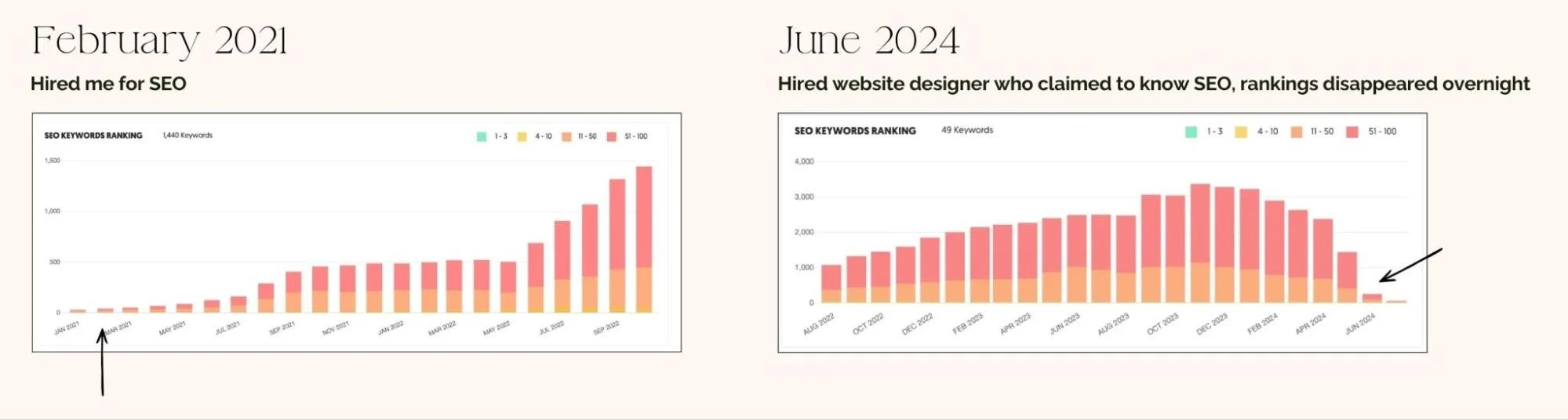
Essentially told Google the entire site was brand new with zero authority.
This story isn't rare. It's heartbreakingly common. Business owners invest in beautiful redesigns and watch their hard-earned search rankings vanish because nobody protected the SEO foundation during the transition.
TL;DR: Website redesign SEO requires strategic planning before you start - specifically preserving existing URLs (or setting up proper 301 redirects), maintaining optimized content and title tags, protecting properly named images and alt text, and following a methodical launch process. When done correctly, most sites see ranking improvements post-redesign because you're combining existing authority with better user experience and updated optimization.
But here's what most small business owners miss:
The biggest SEO damage happens before the redesign even starts - when designers don't audit what's currently working
Image file names seem like tiny details but losing them during redesigns costs rankings in both web and image search
You can't just "add SEO back in after launch" - by then, Google has already deindexed your old URLs
After working in SEO since 2016 and completing 40+ website redesigns without destroying clients' rankings (and fixing many websites after other designers broke them), I know exactly what separates successful redesigns from ranking disasters.
Let me show you how to redesign a website without losing SEO results.
Does Website Redesign Affect SEO? The 4 Fatal Mistakes
Yes - website redesign absolutely affects SEO, but whether that impact is positive or negative depends entirely on your process. Here are the four mistakes that destroy rankings during redesigns.
Mistake 1: Changing URLs Without Redirects
This is the single biggest ranking killer.
Your current website has URLs like "yoursite.com/business-coaching" that Google has indexed and ranked. The redesign creates new URLs like "yoursite.com/services/coaching" and nobody sets up redirects from old to new.
What happens? Google tries to access your old URLs, gets 404 errors, and assumes that content no longer exists. All the authority, backlinks, and ranking power disappears.
Your new URLs start from zero.
This is the most preventable disaster in website redesigns for SEO, yet it happens constantly because designers don't prioritize technical implementation.
Mistake 2: Destroying Optimized Copy
Your current site has content ranking for specific keywords. Maybe your services page includes "business coaching for female entrepreneurs" or location-specific phrases woven naturally throughout. Then the redesign happens and a well-meaning copywriter "improves" your content - removing those keyword-rich phrases in favor of vague, creative marketing language.
The painful reality: Clients invest $3,000+ in professional copywriting during redesigns, the new copy sounds beautiful, and their rankings tank because nobody told the copywriter which phrases needed to stay for SEO reasons.
Mistake 3: Uploading Images Without Proper File Names or Alt Text
Your current website might have images named descriptively: "seattle-business-coach-headshot.jpg," "female-entrepreneur-workshop.jpg." These filenames help Google understand what images show and contribute to rankings in both web and image search.
During redesigns, designers download images that get renamed to generic filenames ("IMG_1234.jpg," "photo-001.jpg"), and those meaningless filenames get uploaded to the new site.
All the SEO value from descriptive image names disappears. The same happens with alt text when strategic descriptions are removed.
Mistake 4: Breaking Title Tags and Technical SEO
Title tags are the clickable headlines in search results - different from your H1 headline on the page itself. Strategic title tags like "Business Coaching for Female Entrepreneurs | Seattle | [Name]" get replaced with generic ones ("About," "Services") or overly long ones that get cut off in search results.
Beyond title tags, redesigns break other technical elements: proper heading structure, internal linking patterns, page speed optimization, mobile responsiveness, and schema markup.
Understanding the complete list of SEO elements to implement on every website shows exactly what needs protection during redesigns.

How to Redesign Website Without Losing SEO: The Pre-Redesign Audit
Before changing anything on your website, document exactly what's working from an SEO perspective. This audit happens before you hire a designer, before you write new copy, before any decisions about the new site.
I do this for every single website design client that has keywords ranking on page 1.
Document Your URLs and Build a Redirect Map
Create a complete list of every URL on your current website - every blog post, service page, portfolio piece, everything indexed by Google. Use Screaming Frog (free for up to 500 URLs) to crawl your site and export a complete URL list.
This becomes your redirect map. Any URL that changes needs a 301 redirect from old to new. Having this complete list prevents the "oh, we forgot about those old blog posts" disaster that happens constantly.
Export your URL list with columns for:
Current URL
Page title
Current organic traffic (from Analytics)
Current rankings (from Search Console)
New URL (to be filled in during redesign)
Redirect status (to be checked before launch)
Audit Your Optimized Copy and Keywords
Pull data from Google Search Console showing which pages rank for which keywords and at what positions. Then document the specific keyword-rich phrases generating those rankings.
For each important page, note:
The exact title tag (in page metadata, not the H1 headline)
Keywords in the H1 headline
Specific keyword phrases in body copy (especially first paragraph)
Location-specific phrases if you rank for local searches
Service-specific language matching what people search
Give this documented copy to anyone writing new content during the redesign. They don't need to use exact sentences, but they need to know which keywords and phrases must stay somewhere on each page.
Create an Image Optimization Inventory
Document every image's current SEO status: filenames, alt text, which images drive traffic from image search, file sizes, and images on your highest-ranking pages.
Good image filenames are descriptive and include relevant keywords naturally. "Seattle-business-coach-working-with-client.jpg" is strategic. "IMG_1234.jpg" provides zero SEO value.
During redesigns, every image needs intentional, descriptive filenames - not whatever random name your designer's computer assigns.
This takes maybe 30 extra seconds per image but significantly impacts rankings. Learn more aboutimage optimization for SEO.
Document Title Tags and Meta Descriptions
For every important page, document the exact current title tag (check page source, not the H1), whether it's optimized (under 60 characters, includes keyword, compelling), and current meta description (under 155 characters ideally).
Common title tag mistakes during redesigns: making them too long (gets cut off), too vague ("Home," "About"), removing location keywords, creating duplicates across pages, or forgetting to add them at all.
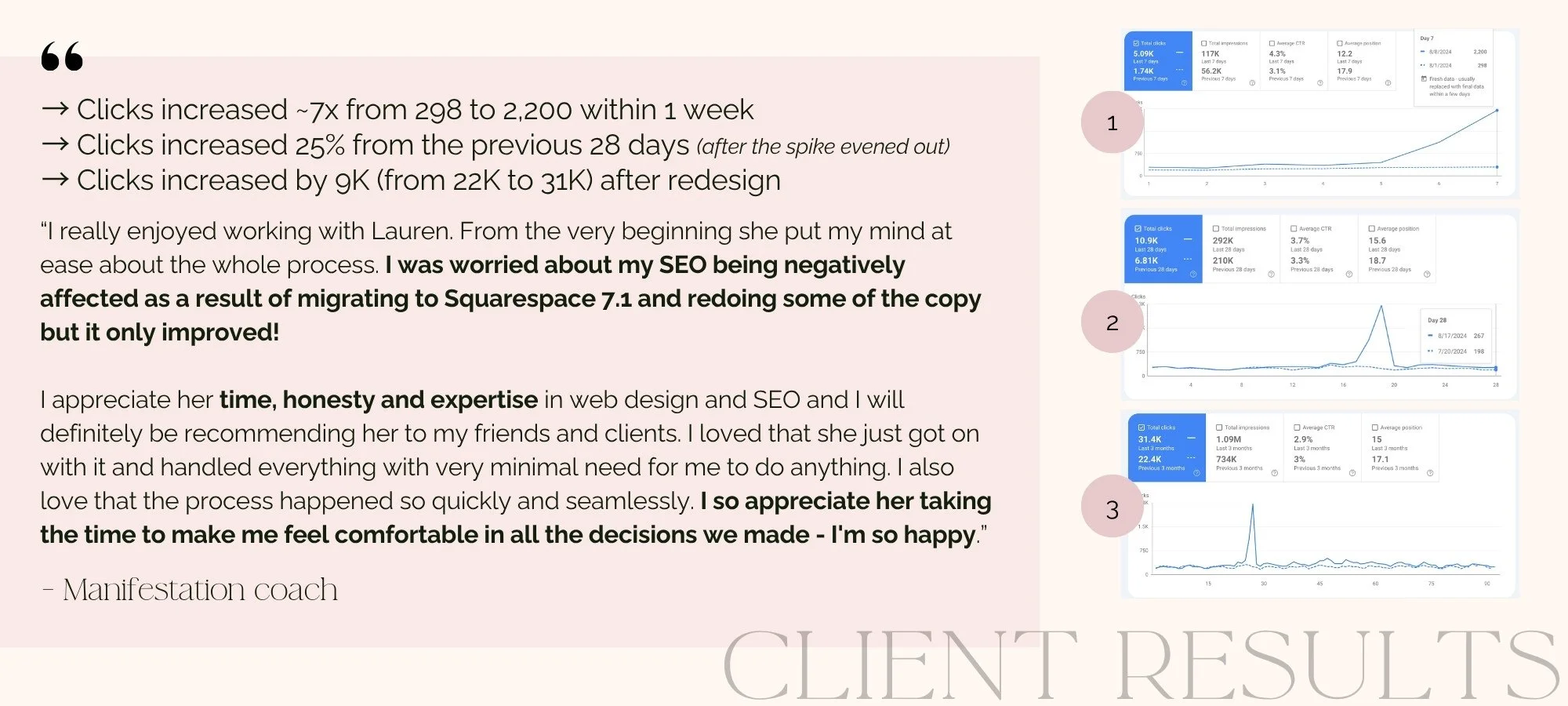
Here’s what happened when I took all the necessary precautions for my client, who was already ranking #1 for keywords relating to her services:
SEO and Website Redesign: Protection During the Build
Maintaining URLs
You have three options for handling URLs during a redesign:
Option 1: Keep all URLs exactly the same. Safest SEO approach. If current URLs work and make sense, don't change them. The redesign updates design, layout, and content while maintaining the same URL structure. Best for sites with strong existing rankings and logical URLs.
Option 2: Change URLs strategically with proper 301 redirects. Sometimes URL changes make sense - confusing structure, consolidating pages, or terrible URLs. Change what needs changing, but set up 301 redirects from every old URL to its new equivalent.
Option 3: Completely rebuild URL structure. Highest risk but sometimes necessary if current structure is fundamentally broken. Requires meticulous redirect mapping and realistic expectations about potential temporary ranking fluctuations.
The redirect setup that actually works: Every redirect must be a 301 redirect (permanent, not 302 temporary). The old URL should redirect to the most relevant new URL - not just your homepage. Test every single redirect before launch using Screaming Frog or manual checking.
Preserve Optimized Copy While Refreshing Content
Give your copywriter the documented list of keywords and phrases that must appear somewhere on each page. They can rewrite everything around those elements - updating voice, improving flow, adding insights - but core SEO phrases need to stay.
What you CAN change without hurting SEO:
Voice and tone
Story elements and personal anecdotes
Expanded explanations and context
Updated examples and client stories
Improved flow and readability
What you CANNOT change without SEO risk:
Target keywords and phrases driving rankings
Location-specific language for local searches
Service-specific terminology matching what people search
Industry language signaling relevance to Google
Implement Proper Image Optimization
Before uploading any image, rename it with a descriptive, keyword-relevant filename. After uploading, immediately add strategic alt text. Compress all images to get files under 500KB without visible quality loss.
The strategic naming convention: Include relevant descriptive words, your location if locally relevant, your service or specialty if appropriate. "Portland-business-coach-speaking-workshop.jpg" is strategic. "DSC_0012.jpg" is worthless for SEO.
Create Optimized Title Tags and Meta Descriptions
Every page needs custom, strategic title tags and meta descriptions in your platform's SEO settings. Create a spreadsheet with columns for page name, H1 headline, title tag, and meta description. Fill this out during content creation BEFORE anything gets built, then verify after launch.
Learn more about common website mistakes that tank conversions and rankings - many happen during redesigns when details get overlooked.

Website Redesign for SEO: Post-Launch Monitoring
Your redesign launches and looks beautiful. Now comes the critical 4-8 week monitoring period where you catch and fix issues before they cause permanent damage.
Week 1 Post-Launch: Immediate Checks
First 24 hours:
Verify all redirects are working (test every old URL)
Check that Google Analytics is tracking properly
Confirm Search Console is receiving data
Test all contact forms and conversion points
Check mobile functionality thoroughly
Warning signs: Sudden spike in bounce rate signals user experience problems. 404 errors in Search Console mean users or Google are hitting dead ends. Pages not getting indexed means Google can't find them.
Weeks 2-8: Ranking Monitoring and Optimization
Track rankings for main keywords (expect minor fluctuations, not massive drops), organic traffic compared to pre-redesign baseline, click-through rates from search results, and conversion rates.
What's normal vs. what's a problem:
Normal: Minor ranking fluctuations (position 3 to position 5). Google is reassessing your pages.
Problem: Major ranking drops (position 3 to position 20+) indicate serious SEO issues needing immediate attention.
Based on tracking 50+ redesigns through post-launch: Sites that properly protected SEO see average ranking improvements of 15-30% within 2-3 months. Not just maintaining rankings - actively improving because the redesign included strategic SEO enhancements on top of existing authority.
Want to know when to redesign your website without hurting SEO? Timing matters less than process.

Working With Designers: Ensuring SEO Protection
Most website designers aren't SEO experts. They're trained in visual design, user experience, and brand expression.
The question isn't "should my designer handle all SEO" but "how do I ensure SEO doesn't get destroyed during the design process?"
Option 1: Hire a Designer Who Includes SEO
Ask specifically about their SEO process during redesigns. Request examples of client sites they've redesigned where rankings improved post-launch.
Verify they audit existing SEO before starting design work.
I built SEO into my VIP Design Day process specifically because I got tired of seeing beautiful redesigns destroy clients' businesses.
Every VIP Design Day includes comprehensive SEO strategy, proper technical implementation, optimized content preservation, strategic image optimization, and post-launch monitoring. Learn more about the VIP Design Day experience.
Option 2: Hire Separate SEO Support
If you love a designer who doesn't specialize in SEO, hire separate SEO support to manage that aspect. The SEO expert audits your current site, documents everything needing protection, creates specifications for the designer, and monitors post-launch.
This collaborative approach works beautifully when everyone understands their role and communicates clearly.
Frequently Asked Questions About SEO for Website Redesign
What are the essential SEO considerations before a website redesign?
The essential SEO considerations before redesigning include: documenting all current URLs for redirect mapping, auditing optimized copy and keywords that drive rankings, inventorying image filenames and alt text, recording title tags and meta descriptions for all important pages, and establishing your technical SEO baseline (site speed, mobile responsiveness, internal linking patterns, heading structure).
What tools should I use for auditing website SEO health pre-redesign?
For pre-redesign SEO audits, use Google Search Console (shows which pages rank for which keywords), Google Analytics (reveals traffic sources and page performance), Screaming Frog (crawls your site to export URL lists and identify technical issues), Google PageSpeed Insights (measures site speed and Core Web Vitals), and your platform's built-in SEO tools for checking title tags and meta descriptions. I also use Semrush or Ubersuggest for additional analytics and keyword tracking.
How do I choose an SEO-friendly website redesign service?
Choose an SEO-friendly redesign service by asking about their specific SEO process during redesigns, requesting before/after ranking data from previous client redesigns, verifying they conduct pre-redesign SEO audits, checking if SEO is included in pricing or an expensive add-on (should be integrated), and confirming they provide post-launch monitoring to catch issues early.
How to create an SEO-friendly URL structure for a new website design?
Create an SEO-friendly URL structure by keeping URLs short and descriptive (yoursite.com/business-coaching), including primary keywords naturally, using hyphens to separate words (not underscores), avoiding unnecessary parameters or numbers, maintaining a logical hierarchy that reflects site structure, and setting up 301 redirects from any old URLs to their new equivalents if changes are necessary.
What are best practices for managing 301 redirects during a site migration?
Best practices for 301 redirects include: creating a complete redirect map before launch showing old URL to new URL pairings, redirecting every old URL to its most relevant new page (not just homepage), using 301 redirects (permanent) not 302 (temporary), avoiding redirect chains (A to B to C), testing every redirect before launch on both desktop and mobile, and monitoring Search Console for 404 errors post-launch indicating missed redirects.
Ready to Redesign Without the Ranking Disaster?
Website redesigns shouldn't be terrifying. When managed strategically with proper SEO protection, they're opportunities to improve both your visual brand AND your search rankings - combining existing authority with better optimization and user experience.
The difference between redesigns that destroy rankings and those that improve them comes down to process. Protect what's working, enhance what can be better, and follow a methodical approach that prevents the common mistakes costing businesses months of lost traffic and revenue.
If you're ready for a website redesign and want SEO handled properly from start to finish, I have two options depending on your specific situation:
VIP Design Day: Complete Website Design + SEO Integration
If you want your entire website redesigned with SEO built into the process from day one, the VIP Design Day is the comprehensive solution.
What's included:
Complete pre-redesign SEO audit documenting everything that needs protection
Strategic website design completed in 1-2 intensive days
SEO optimization integrated throughout (optimized copy, proper image naming, strategic title tags)
All redirects mapped and implemented if URL changes are necessary
Post-launch monitoring to ensure rankings maintain or improve
30 days of support after launch for adjustments
You're ready for a VIP Design Day if:
You need both design and SEO handled comprehensively
You want reassurance that SEO won't get destroyed during redesign
You value working with one expert who manages the entire process
You're ready to invest in professional design and optimization together
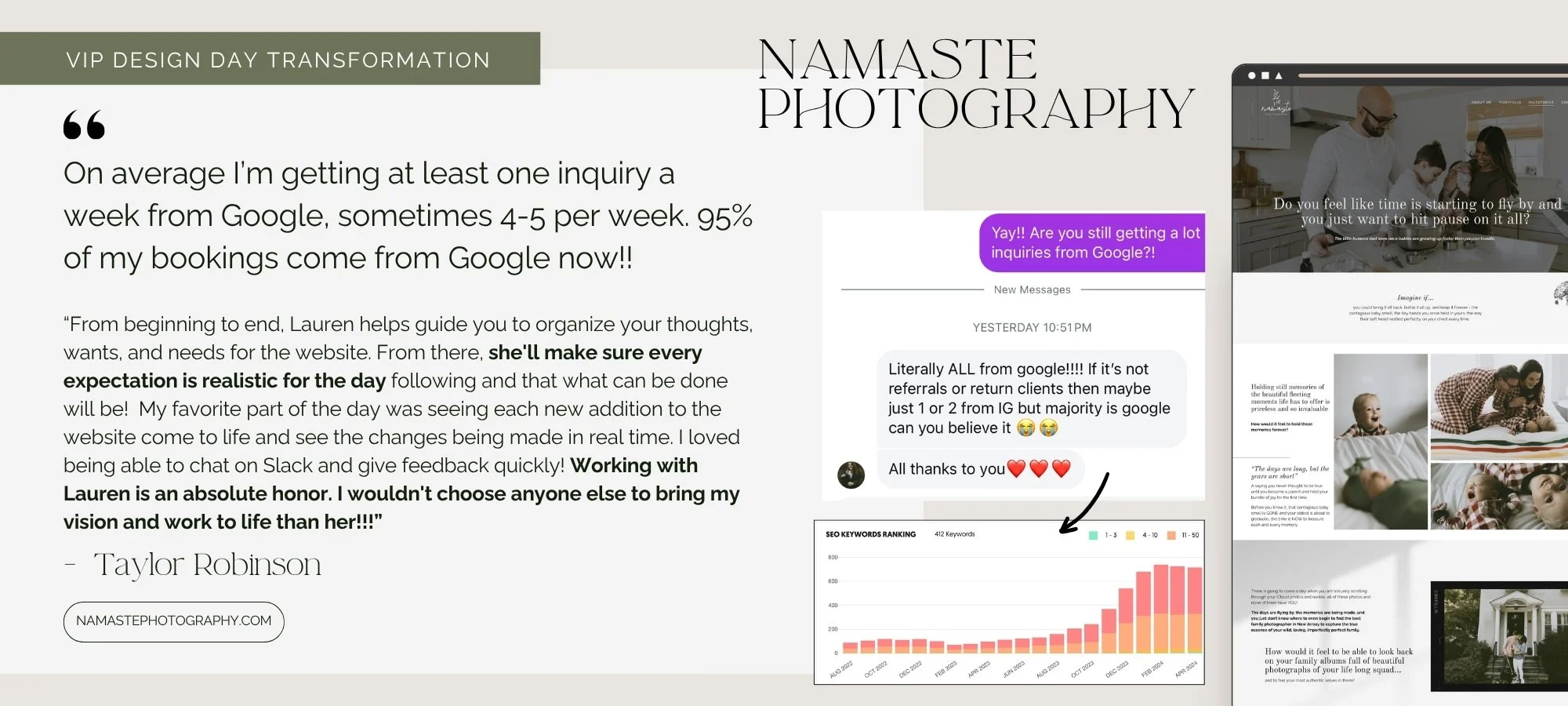
SEO VIP Day: Strategic SEO Support for Your Chosen Designer
If you've found a designer you love who doesn't specialize in SEO, the SEO VIP Day provides comprehensive SEO management alongside your design project.
What's included:
Complete pre-redesign audit creating documentation your designer needs
Redirect mapping for all existing URLs
Optimized title tags and meta descriptions for every page
Image optimization strategy and guidelines
Technical SEO specifications and requirements
Post-launch monitoring and optimization for 30 days
You're ready for an SEO VIP Day if:
You've found a designer whose work you love but who doesn't include comprehensive SEO
You have valuable existing rankings you absolutely cannot afford to lose
You want specialized SEO expertise managing that aspect specifically
You recognize SEO during redesigns requires dedicated focus
Either approach ensures your redesign improves your business instead of destroying it. The choice depends on whether you need complete design + SEO together, or SEO expertise supporting a separate designer. Both paths protect your rankings while giving you the website transformation you're ready for.
Now, tell me—have you been naming your images correctly? Or did you have an “oops” moment reading this post? Leave a comment below!
Looking for more blogging and SEO tips? Check out these blog posts:
